
7 reasons to automate your Accounts Receivable

Cash flow is the core way to running a successful business, yet payment delays are common. Getting paid on time sustain daily operations, and automating your accounts receivable processes helps create a more structured and predictable collections process.

Accounts receivable automation in Business Central

Accounts receivable (AR) automation refers to software that streamlines invoicing and payment processes. It helps ensure invoices are handled accurately and consistently, reducing delays caused by missing references, formatting issues, or delivery to the wrong recipient.

In Microsoft Dynamics 365 Business Central, financial transactions are managed within the ERP. However, related workflows such as document distribution, reminder handling, and customer-specific requirements often still involve manual steps. AR automation extends the ERP with structured, rule-based document and communication workflows that run directly on your data.
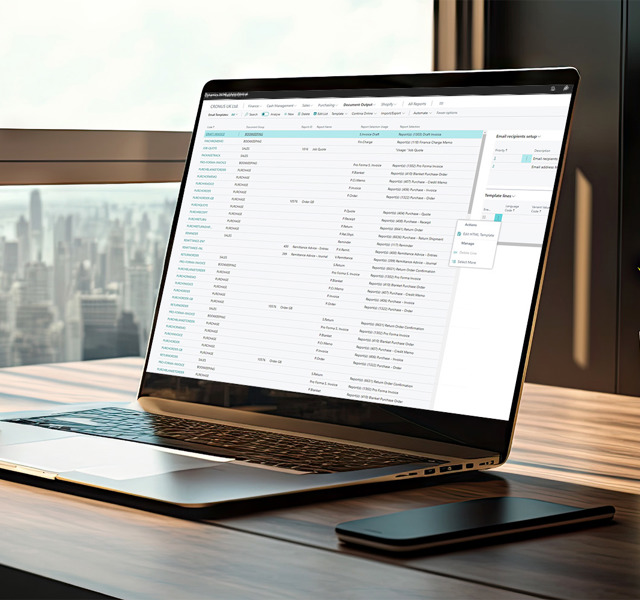

 

How AR automation works in practice

AR automation relies on predefined rules to keep routine work consistent and repeatable. Robotic process automation (RPA) supports this by executing predictable steps in the background based on configured settings.

In practice, this means document distribution and reminder workflows can be automated. Invoice documents are formatted using templates and ERP data, sent in batches, and delivered according to customer-specific requirements. Reminders are triggered at defined intervals, and overdue invoices can be attached automatically to follow-up messages.

The sections below outline practical reasons why automating accounts receivable can strengthen compliance, improve cash flow, and support a more efficient finance function.

How automation improves your accounts receivable process

1. Reduce manual work and administrative costs

Accounts receivable processes often rely on repetitive tasks such as preparing invoices, distributing documents, sending reminders, and tracking overdue payments. As transaction volumes grow, these activities consume valuable resources while placing increasing pressure on finance teams. 

Automation replaces these manual steps with structured, rule-based workflows. Invoices are generated quickly with standardized templates, documents are distributed automatically, and reminders follow a predefined schedule. 

2. Accelerate cash flow and reduce DSO

Delays in collections directly affect liquidity. When invoices remain unpaid, revenue is tied up in receivables instead of being available to support operations and future growth. Days Sales Outstanding (DSO) measures how long it takes to collect payment after a sale, and inconsistent follow-up often extends this cycle.

In many organizations, delays are not caused by unwilling customers but by process gaps. Invoices may not be sent immediately, reminders may depend on manual tracking, or documentation may be incomplete.

3. Improve accuracy and reduce payment delays 

Invoice errors are one of the most common reasons for delayed payments. Missing reference numbers, incorrect formats, or incomplete documentation can prevent customers from processing invoices efficiently. Even small inconsistencies can result in invoice queries, additional follow-up, and extended payment cycles. 

Automation introduces consistency into the process. Standardized templates ensure required information is included, and customer-specific delivery requirements are applied automatically. Documents are generated and distributed according to predefined rules, reducing reliance on manual handling.

4. Ensure compliance with e-invoicing requirements

E-invoicing requirements are increasing across many regions, and more customers expect invoices to follow specific formats or be delivered through approved electronic networks such as Peppol. When these requirements are not met, invoices may be rejected, returned, or delayed.

Automating your accounts receivable process helps ensure that invoices are delivered in the correct format and through the appropriate channel every time. Customer-specific invoicing rules can be stored and applied automatically, reducing the risk of errors and avoiding unnecessary back-and-forth.

5. Strengthen document security and control

Invoices contain sensitive financial information and must be protected throughout their lifecycle. Manual distribution increases the risk of documents being tampered with, forwarded incorrectly, or accessed without authorization.

Automation strengthens control by enabling secure distribution and protective measures such as digital signatures, watermarking, and password protection. In addition, a structured audit trail provides clear documentation of when invoices were created and sent.

6. Improve employee satisfaction and productivity

Accounts receivable processes often involve repetitive administrative tasks such as managing document distribution, sending reminders, and monitoring overdue payments. Over time, these routine activities can consume a significant share of the finance team's capacity, limiting both productivity and job satisfaction. 

Automation, however, streamlines these workflows and reduces dependence on manual intervention. Document distribution and reminder processes run consistently in the background, which frees the team from repetitive handling. 

7. Support a paperless and scalable finance function

Paper-based invoicing requires printing, postage, and physical storage, all of which consume resources and add administrative complexity. Moving to digital document distribution reduces paper usage, minimizes waste, and simplifies document handling. 

Digitizing your accounts receivable process is a practical step toward a more environmentally responsible and efficient finance function. It supports sustainability initiatives while creating workflows that are easier to manage and scale.

Key benefits of Accounts Receivable automation

As outlined above, automating accounts receivable delivers several practical benefits that improve operational efficiency and strengthen financial control.

Reduced administrative workload

Automation removes repetitive tasks such as document distribution and reminder handling, streamlining receivables workflows and reducing manual effort.

Higher team productivity

With fewer routine tasks to manage, finance professionals can focus on analysis, planning, and proactive customer communication.

Improved cash flow

Consistent invoice distribution and automated reminders help accelerate collections and reduce payment delays.

Stronger document security

Digital signatures, watermarking, and audit trails help protect financial documents and improve control.

Greater accuracy and compliance

Standardized templates and automated rules ensure invoices meet customer and regulatory requirements.

More sustainable operations

Digital document distribution reduces paper usage while supporting a more efficient and environmentally responsible finance function.

Let Continia handle the manual work

Continia removes repetitive and time-consuming tasks from your accounts receivable processes, enabling your finance team to focus on work that drives value. With Continia Document Output, document distribution is automated directly within Microsoft Dynamics 365 Business Central, creating a more consistent and controlled process.

If you are ready to modernize your receivables workflows and strengthen your financial operations, discover how Continia can help you streamline and optimize your receivables processes.

Key features of Document Output:

✔️ 40+ ready-to-use templates for fast and flexible document generation

✔️ Batch send or print documents to save time and reduce manual effort

✔️ Maintain a clear overview of each customer's invoicing requirements

✔️ Connect to the Peppol Network for compliant e-invoicing

✔️ Automatically merge and attach overdue sales invoices to reminder emails

✔️ Protect documents with digital signatures, watermarks, and password security

✔️ Set up automated rules to ensure each recipient receives the right document, at the right time, through the right channel

Take control of your accounts receivable

Accounts receivable automation becomes simple with Continia Document Output. Click below to learn more and see how you can streamline document distribution and strengthen your receivables processes.

Learn more